Custom Observations by 3rd party Applications
Learn how to extend the Governor with custom observations submitted by 3rd-party applications.
Steps
- Create 3rd-party Observer AppRegistration
- Grant Permissions to Governor API
- Modify Policy DB
- Add Configuration Type(s), Object Type(s) and Schema(s)
- Submit Observation Results to the API
Sample Scenario: Push MFA Settings for Users to Governor
In this sample, we're going to extend Governor to also have MFA Settings for Users available in Governor.
The observation of the MFA settings will be done with a simple powershell script running outside of Governor.
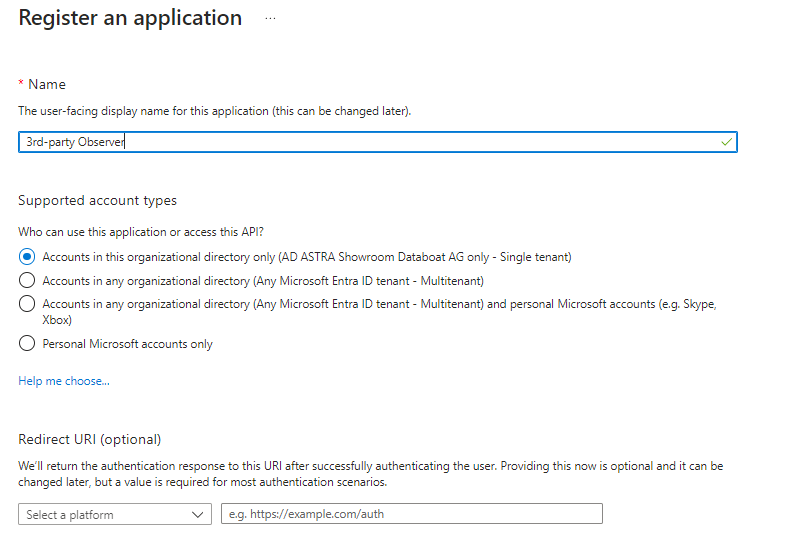
Create 3rd-party Observer AppRegistration
In order to submit observation results from a 3rd-party Observer, you will need a Service Principal in Entra ID.
Grant Permissions to Governor API
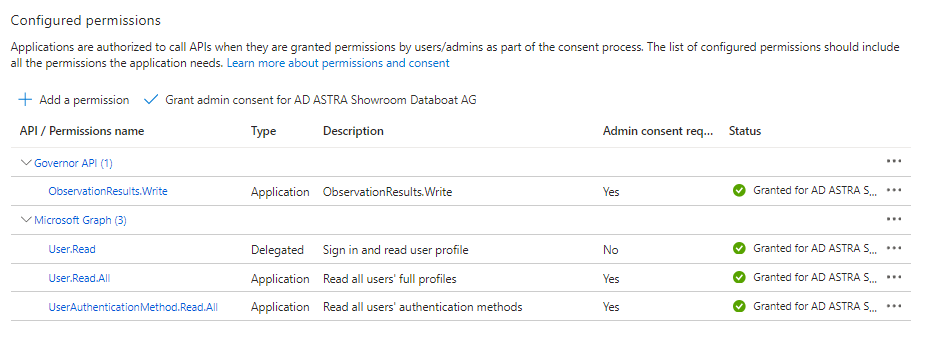
Your service principal requires the ObservationResults.Write permissions on Governor API to submit observation results.
The other permissions are needed to connect to Graph API and fetch the required information. In this sample, we're going to collect MFA related settings on users; so we need User.Read.All and UserAuthenticationMethod.Read.All permissions as well.
Modify Policy DB
To allow your 3rd party Observer to submit observation results, you need to:
- Define a role for your observer
- Assign the service principal to that role
First, you need to get the Service Principal Identity Object ID and Tenant ID. You can get them from the Entra ID Portal. !Don't confuse Object ID with Client ID, that's something different!

When you gathered the Object ID and Tenant ID of your 3rd party Observer Service Principal, you can modify the Policy DB.
We recommend you to follow the GitOps pattern. To do this, add the new role and the role assignment for your service principal to your policy_db-init-data.sql file in your terraform environment.
Add the following SQL statements to define the role permissions and the role assignment for your service principal.
--my-governor-tf.git/environment/<ENVIRONMENT_NAME>/policy_db-init-data.sql

-- Define a role 'custom observer'.
-- Syntax: ('<ROLE-NAME>', '/', '/ObservationResult:<ConfigurationType.Id>', '(write)')
INSERT INTO "Policies" ("Group", "Space", "Object", "Action") VALUES
('custom-observer', '/', '/ObservationResult:UserMfa', '(write)')
ON CONFLICT ON CONSTRAINT "PK_PolicyDefinition" DO NOTHING;

-- Role assignment for '3rd-party Observer' AppRegistration service principal
-- Syntax: ('<TENANT-ID>/<ENTERPRISEAPP-OBJECT-ID>', '<ROLE-NAME>', '/')
INSERT INTO "Members" ("UserID", "Group", "Space") VALUES
('eeeef6f0-2dd7-4f7f-84d1-a23d9d1a7acc/1464bbcc-70a1-451c-a227-375f6d1402e6',   'custom-observer',  '/')
ON CONFLICT ON CONSTRAINT "PK_PolicyMembership" DO NOTHING;
Alternatively, as a Governor Admin, you can also push the policy changes to the policy DB via Governor API. Check out the swagger docs for more details.
Be aware that policy DB modifications done via Governor API can be overwritten by the next terraform deployment.
Add Configuration Type(s), Object Type(s), and Schema(s)
In this sample, we're going to extend Governor to also have MFA Settings for Users available.
To describe the MFA Settings in Governor we need to define the following assets:
- ConfigurationType
- ObjectType
- ObjectSchema
Configuration Type
The ConfigurationType UserMfa will declare the basic configuration entity and the property values for User MFA Settings.
The observation results, which we're going to create later, will be feed into this definition.
{
  "properties": [
    {
      "id": "Found",
      "displayName": "Settings Found",
      "type": "Condition",
      "order": 0,
      "notNullable": false,
      "isSpec": false,
      "defaultValue": false
    },
    {
      "id": "UserPrincipalName",
      "displayName": "User Principal Name",
      "type": "Text",
      "order": 0,
      "notNullable": true,
      "isSpec": true
    },
    {
      "id": "UserId",
      "displayName": "User ID",
      "type": "Text",
      "order": 0,
      "notNullable": true,
      "isSpec": true
    },
    {
      "id": "HasPasswordAuthentication",
      "displayName": "Password Authentication",
      "type": "YesNo",
      "order": 0,
      "notNullable": true,
      "isSpec": false,
      "defaultValue": false
    },
    {
      "id": "HasPhoneAuthentication",
      "displayName": "Phone Authentication",
      "type": "YesNo",
      "order": 0,
      "notNullable": true,
      "isSpec": false,
      "defaultValue": false
    },
    {
      "id": "HasAuthenticatorApp",
      "displayName": "Authenticator App",
      "type": "YesNo",
      "order": 0,
      "notNullable": true,
      "isSpec": false,
      "defaultValue": false
    },
    {
      "id": "HasWindowsHello",
      "displayName": "Windows Hello",
      "type": "YesNo",
      "order": 0,
      "notNullable": true,
      "isSpec": false,
      "defaultValue": false
    }
  ],
  "id": "UserMfa",
  "name": "User MFA Settings",
  "tableName": "Users",
  "partitionName": "UserMfa",
  "enabled": true,
  "keyProperty": "UserId",
  "mappingProperties": ["UserPrincipalName"],
  "listObservation": null,
  "objectObservation": null,
  "searchProperties": [],
  "uiProperties": {
    "uiCategory": "Azure AD",
    "uiTitle": "Azure AD User MFA Settings",
    "uiSubtitle": "Monitor User MFA settings in Azure AD",
    "uiIconClass": "fas fa-solid fa-user",
    "uiColumns": [
      "UserPrincipalName",
      "UserId",
      "HasPasswordAuthentication",
      "HasPhoneAuthentication",
      "HasAuthenticatorApp",
      "HasWindowsHello"
    ],
    "uiSearchTerms": ["inventory", "users", "mfa", "azure", "aad", "m365"]
  }
}
Object Type
The ObjectType UserMfa will use the ConfigurationType UserMfa to form a "User MFA Settings" Object in Governor.
{
  "id": "UserMfa",
  "name": "User MFA Settings",
  "displayNameProperty": "UserMfa.UserPrincipalName",
  "masterKeyProperties": ["UserMfa.UserPrincipalName"],
  "configurationTypes": ["UserMfa"],
  "uiProperties": {
    "uiCategory": "Azure AD",
    "uiTitle": "User MFA Settings",
    "uiSubtitle": "Observe User MFA settings in Azure AD",
    "uiIconClass": "fas fa-solid fa-user-group",
    "uiColumns": [
      "UserMfa.UserPrincipalName",
      "UserMfa.HasPasswordAuthentication",
      "UserMfa.HasPhoneAuthentication",
      "UserMfa.HasAuthenticatorApp",
      "UserMfa.HasWindowsHello",
      "schemaId",
      "lifecycle",
      "objectStatus",
      "status"
    ],
    "uiSearchTerms": ["managed", "user", "mfa", "azure", "aad", "m365"]
  }
}
There could be additional configuration types to compose an object type, but for this example we just need a single configuration type to compose the "User MFA Settings" object.
This might look complex in the beginning, but it is also a charming feature of Governor.
Because each configuration type is listed/re-observed individually, it simplifies the scripting of complex business scenarios. You can break the elephant into pieces.
Of course, the down-side of this approach is the overhead to define an object type and a configuration type, even to compose some simple object like "User MFA Settings".
Object Schema
The ObjectSchema MfaSettings will classify the new objects and give them a default schema.
{
  "id": "MfaSettings",
  "name": "MFA Settings",
  "enabled": true,
  "objectType": "UserMfa",
  "policies": [
    {
      "policyType": "Require",
      "configurationType": "UserMfa",
      "field": "UserId",
      "value": true
    },
    {
      "policyType": "Require",
      "configurationType": "UserMfa",
      "field": "UserPrincipalName",
      "value": true
    }
  ],
  "customActions": [],
  "uiProperties": {
    "endUserFormFields": []
  },
  "defaultLifecycle": "Ignore",
  "objectsExpireAfter": "1.00:00:00"
}
Push the JSON files to Governor API
Push your JSON files to the related Governor API Endpoints. See the Swagger docs for details.
You need to push:
- Configuration Type(s)
- Object Type(s)
- Schema(s)
As soon as Governor knows about your User MFA Settings, we can start to submit observation results.
Submit Observation Results to the API
Here is a basic example that illustrates how to push observation results to the Governor API using a Powershell Script.
# Load client certificate PFX file
$TenantId = "eeeef6f0-2dd7-4f7f-84d1-a23d9d1a7acc"
$ClientId = "9d7c24d9-ef0a-4a29-8213-d2f3d9f99c3d"
$CertificateFile = "your-3rd-party-observer.pfx"
$Certificate = [System.Security.Cryptography.X509Certificates.X509Certificate2]::new($CertificateFile, "")
$GovernorScope = "api://prod.governor.mycompany.org/.default"
$GovernorApi = "https://governor-api.prod.governor.mycompany.org"

# Connect to MS Graph
Connect-MgGraph -TenantId $TenantId -ClientId $ClientId -Certificate $Certificate

# Get access token for Governor API
$tokenResponse = Get-MsalToken -TenantId $TenantId `
                    -ClientId $ClientId `
                    -ClientCertificate $Certificate `
                    -Scopes $GovernorScope

# Prepare request headers to push observation results to Governor API
$headers = @{
    Authorization = ("Bearer {0}" -f $tokenResponse.AccessToken)
    'Content-Type' = 'application/json'
}

# List users
$users = Get-MgUser
foreach ($user in $users)
{
    # Fetch MFA settings
    $authMethods = Get-MsGraphAuthenticationMethod -UserId $user.UserPrincipalName

    # Create Observation Result Payload JSON
    $body = @{
      orderId = ([System.Guid]::NewGuid())
      configurationType = "UserMfa"
      itemId = ("UserMfa:{0}" -f $user.Id)
      observation = @{
        UserId = $user.Id
        UserPrincipalName = $user.UserPrincipalName
        HasPasswordAuthentication = @( $authMethods | Where-Object { $_.AuthenticationMethodId -eq '28c10230-6103-485e-b985-444c60001490' } ).Length -gt 0
        HasPhoneAuthentication = @( $authMethods | Where-Object { $_.AuthenticationMethodId -eq '3179e48a-750b-4051-897c-87b9720928f7' } ).Length -gt 0
        HasAuthenticatorApp = @( $authMethods | Where-Object { $_.AuthenticationMethodId -eq '69a63e02-0f80-40b3-baf2-94ce5a0335e4' } ).Length -gt 0
        HasWindowsHello = @( $authMethods | Where-Object { $_.MethodType -eq 'WindowsHelloForBusiness' } ).Length -gt 0
      }
      parentRefs = @(
        ("AzureADUser:{0}" -f $user.Id)
      )
      message = "Mfa Settings observed"
    } | ConvertTo-Json -Depth 10

    # Submit observation to Governor API
    Invoke-RestMethod -Method Post -Uri $GovernorApi/Observation/success -Body $body -Headers $headers
}

Disconnect-MgGraph